
Platform · Processors and assessments
Know which vendors handle your personal data, on what terms, and what could go wrong.
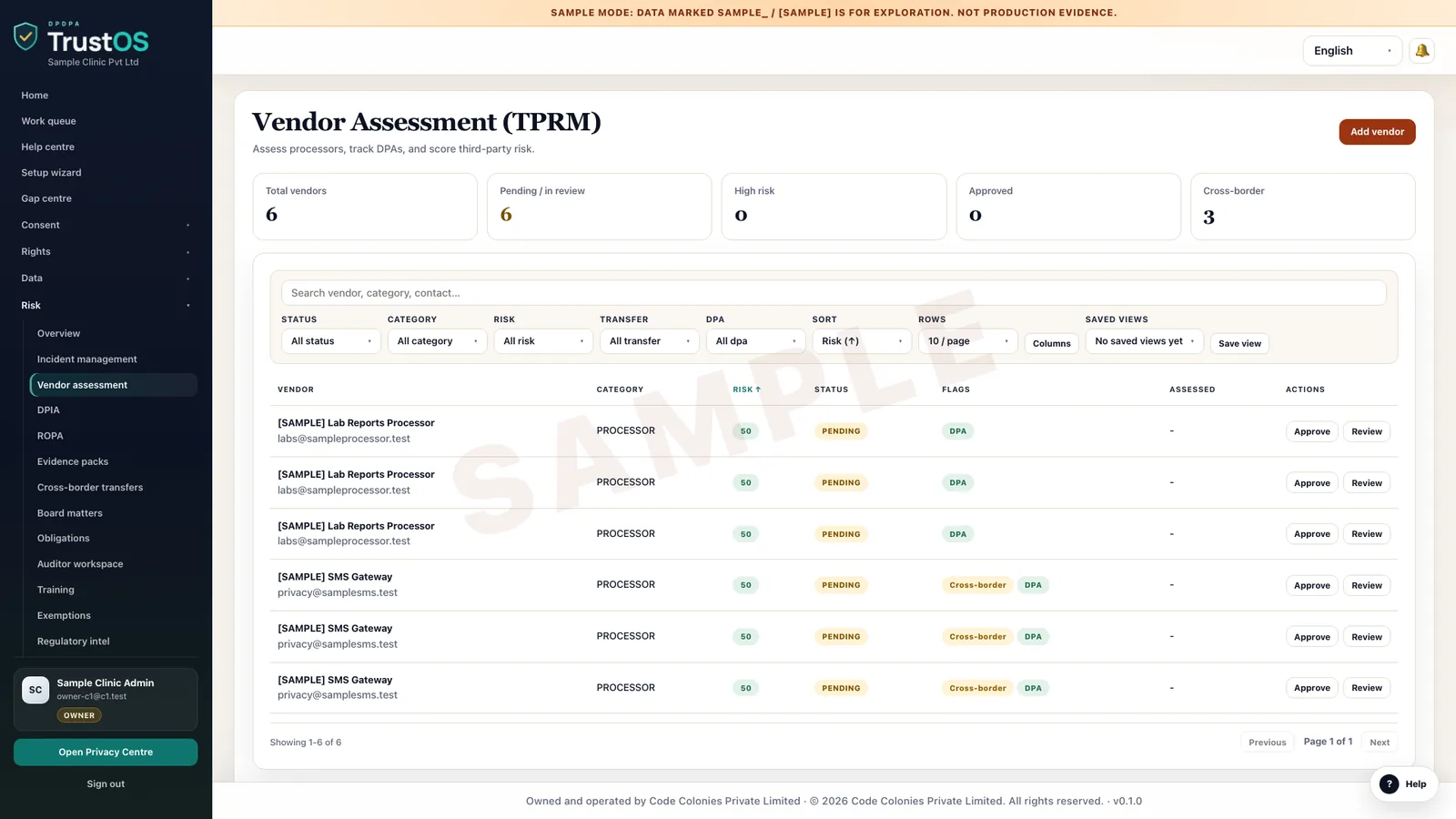
Keep a register of every processor, what data it receives and the contract terms that govern it, with reviews on a schedule. Run impact assessments for risky processing, including the yearly assessment a Significant Data Fiduciary owes, and track the fixes they lead to.
The problem
The vendor list lives in procurement, the risk lives everywhere else
An edtech company sends student names and phone numbers to an SMS gateway, a proctoring vendor, a payment aggregator and a counselling call centre in Jaipur. Procurement has the contracts. Nobody has checked whether the call centre deletes recordings, whether the proctoring vendor uses student videos to train its models, or which of them would tell you about a breach, and how fast.
What the DPDP Act asks
The DPDP Act holds the Data Fiduciary responsible for what its processors do, and allows processing by a processor only under a valid contract. The DPDP Rules expect that contract to include reasonable security safeguards. Significant Data Fiduciaries, once notified by the Central Government, must also carry out a Data Protection Impact Assessment and an audit every year and check that algorithmic software they use does not put Data Principals' rights at risk.
A plain summary. It is not legal advice. Read the DPDP Act guide.
A data map, growing
From systems, to the data in them, to why you hold it
The map is built in three passes: the systems that hold personal data, the categories of data in each, and the purposes each category serves, with an owner for every purpose, shown for an NBFC.
What it does
What processors and assessments gives your team
Processor register
Each processor is recorded with the purposes it serves, the data categories it receives, where it processes them and its own sub-processors. The register is linked to the data inventory, so a new data flow shows up as a missing vendor entry.
Contract term checks
Review each contract against a checklist your legal team sets: security measures, breach reporting time, deletion at the end of service, audit rights and sub-processor approval. Gaps become tasks with an owner and a due date.
Questionnaires and follow up
Send a security and privacy questionnaire to the vendor, receive answers and attachments in one place, and record what you accepted, what you challenged and what they promised to fix.
Impact assessments
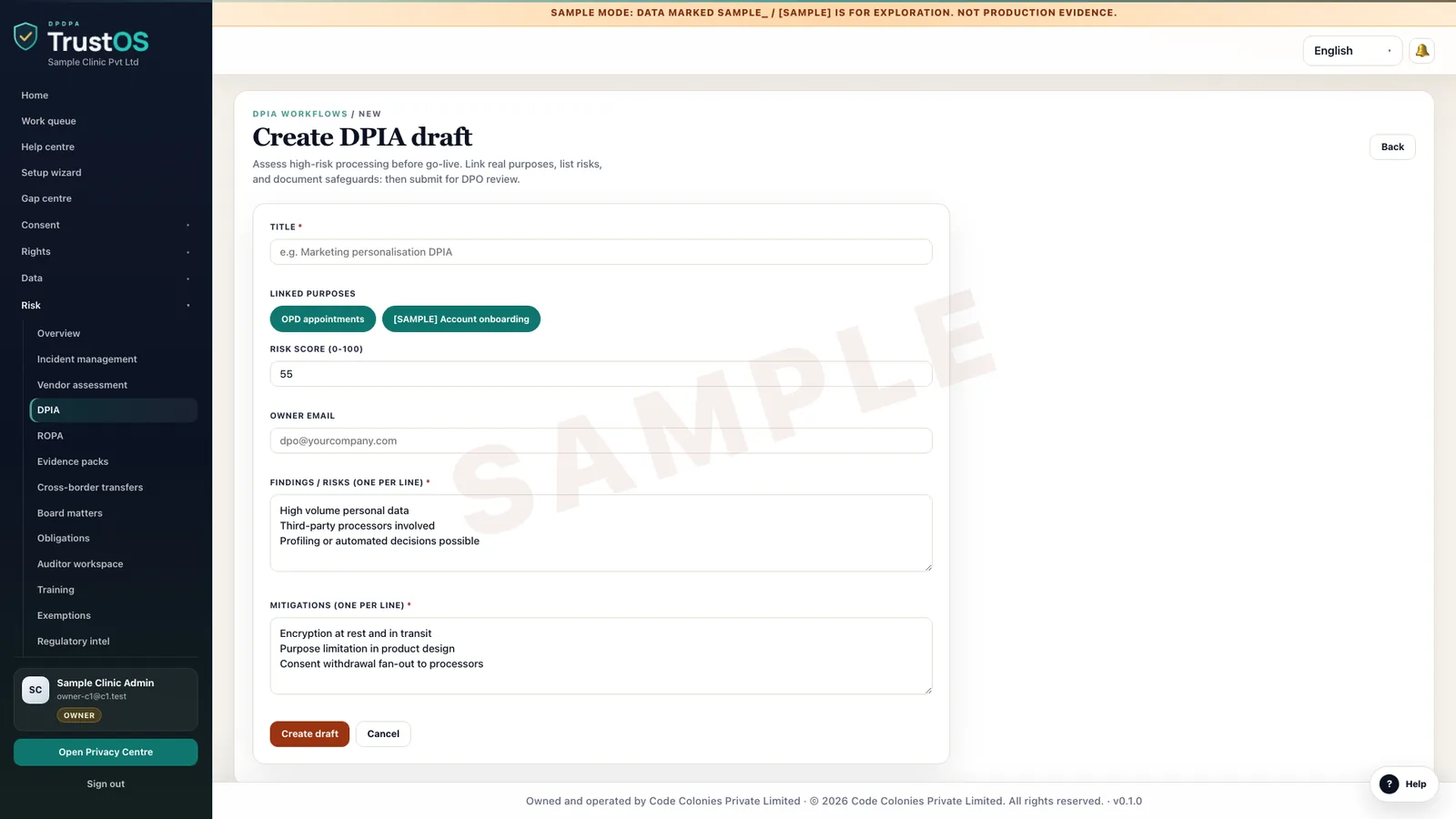
Assess new or risky processing, such as remote proctoring or a credit scoring model, with a set of questions on necessity, risks to people and controls. Findings turn into tracked actions with owners and dates.
Algorithmic system risk review
For automated decisions such as loan eligibility or fraud flags, record what the system does, what data it uses, how it was tested and who reviews its outcomes. TrustOS also keeps an AI processing register of these systems.
Review calendar
High risk processors are reviewed yearly or when their scope changes. TrustOS shows which reviews are due, which are overdue, and which assessments need updating after a change.
How the work moves
Step by step, inside TrustOS
- Step 1Add the processorProcurement or the business owner adds the vendor, the purposes and data it will handle and the contract.
- Step 2Rate the riskPrivacy rates it by data sensitivity, volume and access, which decides the depth of review.
- Step 3Review terms and answersLegal checks the contract and security reviews the questionnaire, logging gaps as tasks.
- Step 4Assess where neededRisky processing gets an impact assessment with findings, actions and a sign off.
- Step 5Schedule the next lookThe next review date is set, and changes in scope or a reported incident bring it forward.
Records it keeps
The evidence builds as you work
- Processor register with purposes, data categories and locations
- Contracts and the term checks made against them
- Vendor questionnaires, answers and accepted exceptions
- Data Protection Impact Assessments with findings and sign off
- Algorithmic system risk reviews and the AI processing register
- Remediation actions agreed with vendors and their status
Who uses it
The teams who rely on it most
The first team usually leads the work. The others act on what it assigns.
Questions
About processors and assessments
Is a Data Protection Impact Assessment required for every company?
Under the DPDP Act and Rules, the yearly assessment is a duty of Significant Data Fiduciaries, who are notified by the Central Government. Many other companies still assess risky processing because it helps them decide and explain. Your legal team decides where it applies.
Can vendors fill in questionnaires inside TrustOS?
Yes. You send a questionnaire link, the vendor answers and uploads documents, and your reviewers comment on each answer. The full exchange stays with the processor record.
Does TrustOS score vendors automatically?
It applies the risk rules you set, such as higher risk for health or children's data. The judgement on whether a vendor is acceptable stays with your reviewers, and their reasoning is recorded.
Keep going
Related modules and reading
Module
Data inventory
A working record of what personal data you hold, where it sits and who touches it.
Learn moreModule
Breach response
Run a personal data breach from first alert to Board report with one clock.
Learn moreModule
Evidence and audit
Answer an auditor's question with the record, in minutes.
Learn moreSee it with your data
Show us where your personal data lives. We will show you TrustOS running on it.
A 30 minute walkthrough on Google Meet with someone who knows the Act and the product. You leave with a view of your first phase, the owners and the effort.
Or get a rollout proposal in two minutes- Step 1A 30 minute demo on Google MeetWith someone who knows the Act and the product.
- Step 2Your systems and purposesWe walk one product's personal data through TrustOS.
- Step 3A first phase you can planModules, owners and effort, written down for you to keep.