
DPDP Act compliance platform
DPDP compliance you can prove.
TrustOS turns each duty in the DPDP Act into assigned work in the systems that hold your data, and keeps the evidence as the work happens.
Runs in your infrastructure or hosted in India · source code handover available
- hours
- 72hoursfor the detailed breach report to the Board
- days
- 90daysouter limit to answer a grievance, Rule 14
- languages
- 22languagesof the Eighth Schedule for every notice
- modules
- 10moduleson one record of data, owners and evidence
Where programmes stall
The Act is clear. The work is scattered.
Most organisations already have a privacy policy. What they lack is a way to run the duties behind it, every day, across systems that were never built with the DPDP Act in mind.
Nobody has the full map
Customer data sits in the loan app, the CRM, a WhatsApp number, three spreadsheets and a vendor's server. Until someone writes it down, every notice and every erasure is a guess.
Requests land in an inbox
A customer withdraws consent by email on a Friday. Marketing keeps sending offers on Monday because nobody told the system that sends them.
Proof lives in people's heads
When the Board, an auditor or a bank partner asks what you did and when, the answer is a week of forwarding emails. That is the moment most programmes are judged.
How TrustOS works
From obligation to evidence.
The same four steps sit behind every module, whether the work is a notice, a consent withdrawal, an erasure request or a breach report.
Write down the duty
Each obligation in the Act and the Rules becomes a requirement in TrustOS, mapped to the data and systems it touches.
CON-2291 · sample
A withdrawal must reach every system that used the consent.
Give it an owner
A named person or team, a due date and the steps to follow. Nothing depends on someone remembering.
CON-2291 · sample
Marketing operations, due within two days.
Do the work in your systems
Notices go out, consent changes reach the systems that use it, erasure runs where the data lives.
CON-2291 · sample
Six systems updated, by connector or by an assigned task.
Keep the record
Every step leaves a time stamped entry, so the evidence builds as the work happens.
CON-2291 · sample
Six confirmations kept with the consent record.
The platform
Ten modules, one record.
Start with the two or three you need first. Each one works on the same inventory of data, systems and owners.
Map and prepare4 modules
- Data inventoryA working record of what personal data you hold, where it sits and who touches it.
- Purposes and noticesDecide why you process each kind of data, then tell people in their own language.
- ConsentRecord each consent against the notice shown, and act on withdrawal in every system.
- Privacy CentreOne page where your customers manage consent, make requests and track them.
Respond and act4 modules
- Rights and grievancesEvery request and complaint in one queue, with owners, due dates and a reply on file.
- Retention and erasureDecide how long each kind of data stays, then make sure it actually goes.
- Connectors and actionsFind a person's data in your systems, act on it, and record what really happened.
- Breach responseRun a personal data breach from first alert to Board report with one clock.
Govern and prove2 modules
- Processors and assessmentsKnow which vendors handle your personal data, on what terms, and what could go wrong.
- Evidence and auditAnswer an auditor's question with the record, in minutes.
Where most teams start
The data inventory, notices and the request workflow for one or two products. Later phases add breach response, processors and evidence.
How a rollout runsWatch a withdrawal travel
One switch in the Privacy Centre, every system that used it
A customer turns off WhatsApp offers. The consent record changes, and the withdrawal goes to each system and processor that relied on it, until every one has confirmed. Sample data.
How consent works in TrustOSTwo working surfaces
One for your teams. One for the people whose data you hold.
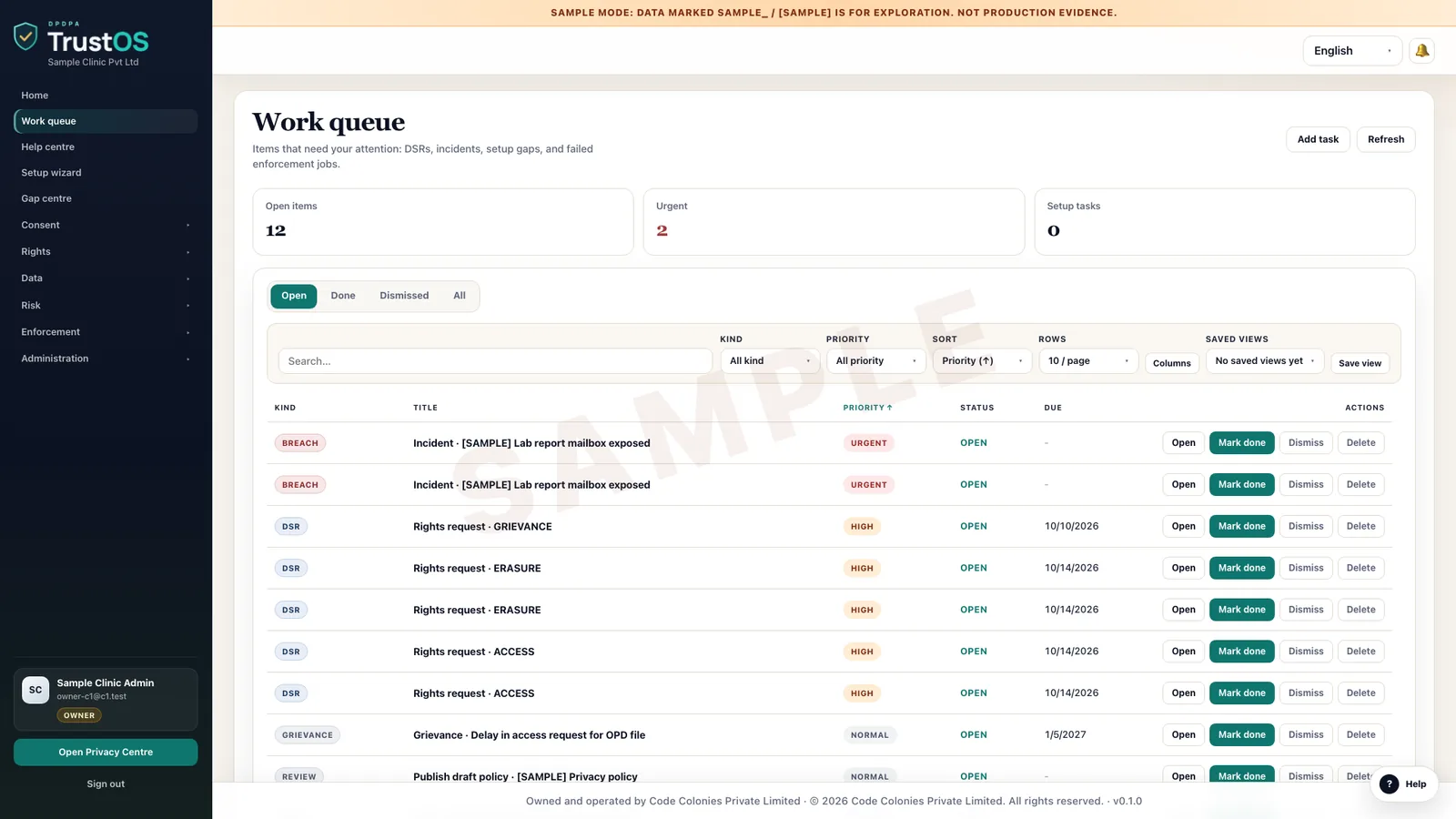
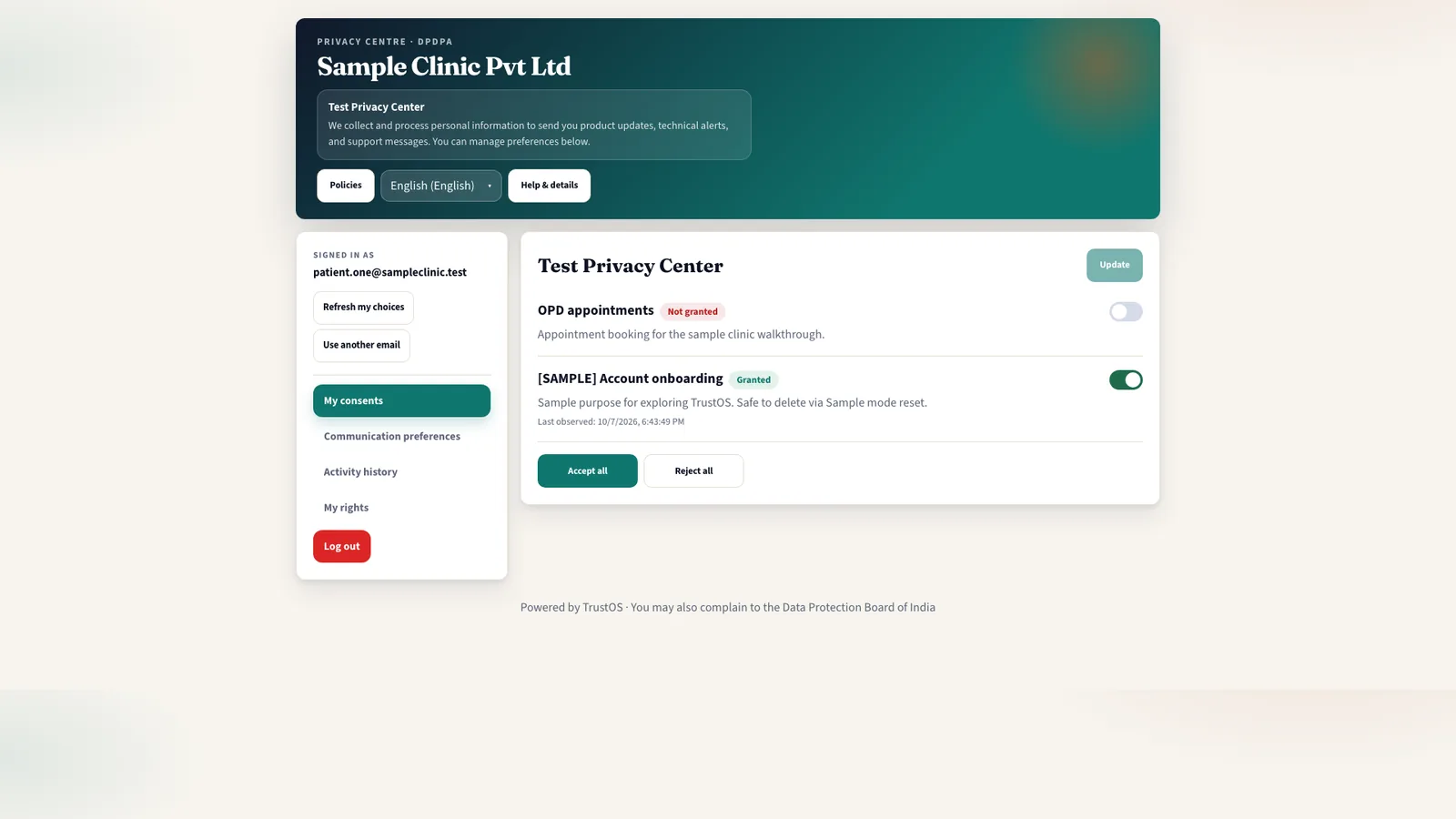
The workspace is where requests, actions and evidence are handled. The Privacy Centre is a page your customers, patients, students or employees use to see their choices and raise requests without writing to anyone.
The TrustOS workspace
The Privacy Centre
Watch one request
From a WhatsApp message to closed evidence, in ninety minutes.
Scroll through a single consent withdrawal as it moves through TrustOS. Sample data, real workflow.
09:14 · It arrives
A customer withdraws consent for WhatsApp offers
The message lands in the request queue with the channel, the person and the products involved. The clock starts, and nobody has to forward an email.
TrustOSPrivacy Centre conversationAKPrivacy Centre conversation
Please stop sending me loan offers on WhatsApp.
Done. We have recorded your withdrawal for marketing messages. Loan servicing messages will continue under your agreement.
CON-2026-2291 created · marketing consent withdrawn
Representative screen with sample data. Client screens stay private. 09:15 · It gets an owner
TrustOS works out who must act, and by when
The withdrawal is matched to every purpose and system that relied on it. Each action gets a named owner and a due date.
TrustOSActions for CON-2026-2291AKRepresentative screen with sample data. Client screens stay private. 10:30 · The work is done
Changes reach the systems that use the data
Connectors apply the change where they can. Where a system cannot be connected, the task goes to a person and their confirmation is recorded.
TrustOSWithdrawal, by systemAKWithdrawal, by system
To do2
- Data warehouse tag
- Ad audiences
In progress2
- Email lists
- SMS vendor
Done2
- WhatsApp suppressed
- CRM flag updated
Representative screen with sample data. Client screens stay private. 10:44 · The evidence stays
Every step is kept, time stamped, for the day someone asks
When the Board, an auditor or a bank partner asks what happened, the answer is one record you can open in minutes.
TrustOSEvidence record CON-2026-2291AKEvidence record CON-2026-2291
- Person
- Ritika Shah
- Channel
- Privacy Centre
- Received
- 10 Oct, 09:14
- Closed
- 10 Oct, 10:44
- Systems
- 6 of 6 confirmed
- Withdrawal recorded
- Owners assigned
- Applied in 6 systems
- Confirmation sent
Representative screen with sample data. Client screens stay private.
Where the law stands
The Rules are notified. The clock is running.
The DPDP Rules, 2025 were notified on 13 November 2025 and come into force in phases. Check for later amendments.
13 November 2025
Rules notified
Definitions and the Data Protection Board provisions take effect.
Around 13 November 2026
Consent Managers
Registration and duties of Consent Managers begin, one year after notification.
Around 13 May 2027
Most duties of Data Fiduciaries
Notice, security safeguards, breach intimation, erasure, children's data and Significant Data Fiduciary duties, unless amended.
Free tools
Work out the deadlines before you need them.
Short tools for the questions DPDP teams ask most. Each one works only from what you enter, and none of them is legal advice.
- Breach clockEnter when you became aware of a breach. See the 72 hour deadline for the detailed report to the Board, the CERT-In 6 hour window, and what to do in each.
- Penalty exposure and readiness scoreDescribe your organisation, your data and the controls that run today. See which heads of the DPDP Schedule apply, their ceilings in rupees, a readiness score and the gaps to close first.
- Privacy notice checkerTick what your privacy notice contains against what the Act and Rules ask. Get the gaps, each with the fix and the provision behind it.
- Request deadline plannerEnter the date a request arrived and its type. See your own targets and the 90 day outer limit for grievances under Rule 14.
- DPDP readiness scoreNine statements about how your DPDP work runs today. Get a score, a band and the gaps to look at first.

Deployment
Your data stays where you decide.
Some organisations want compliance software inside their own walls. Others want someone else to run it. TrustOS supports both.
In your infrastructure
Hosted by us, in India
Your own cloud account or data centre
Servers in India, run by our team
Source code handover in the agreed scope
No new infrastructure to start
Security configuration and documentation
Environment separation, backups and monitoring
Knowledge transfer to your team
Phased adoption, one product at a time
See it for yourself
Six things to check in a demo with your data.
Each of these can be shown in a working session on your own systems and purposes. Ask for any of them by name when you book.
Tamper evident consent
See how each consent record is kept so that a later change shows, along with the notice version the person saw.
Evidence packs you can verify
Export a pack for a period or a question and verify it by its hash.
Notices in 22 languages
Publish one notice in any of the 22 languages of the Eighth Schedule and see the version each person was shown.
Connectors that confirm
Send an erasure to a connected system and see the confirmation come back, with a task for people where no connector exists.
Your infrastructure
Run TrustOS in your own cloud or data centre with source code handover in the agreed scope, or hosted by us in India.
A phased start
Begin with the two or three modules you need first, on the same inventory the later phases will use.
Industries
Built for sectors that hold a lot of personal data.
Each sector has its own data, its own regulators and its own pressure points. Pick yours to see how TrustOS fits.




Films
About a minute each, for your sector.
Short films on what the DPDP Act asks of clinics, lenders and online stores, and how TrustOS keeps the record. There are more for schools, software companies and partner firms.
For organisations · Healthcare
Clinics, labs and hospitals
Patients trust you with their health. What the DPDP Act asks of a clinic, and how proof for audits becomes everyday work.
For organisations · Lending
Lenders and NBFCs
Loan applications, KYC files and collections calls: the DPDP Act for lenders, and how TrustOS keeps the record.
For organisations · Online stores
Online stores and D2C brands
Every order starts at checkout. Shopper data, partner contracts and breaches, for online stores.
Resources
Practical reading for the people doing the work.
Questions
What teams ask us first.
What is TrustOS?
TrustOS is a DPDP Act compliance platform made by Code Colonies Private Limited. It maps the personal data an organisation holds and runs notices, consent, rights requests, erasure and breach response as assigned work with an owner, a due date and a record, so the evidence is ready when the Data Protection Board, an auditor or a customer asks.
Who is TrustOS for?
Any organisation that handles personal data of people in India and wants its DPDP work to run as normal operations: banks and NBFCs, insurers, hospitals and diagnostic chains, e-commerce and D2C brands, education providers, software and services firms, and public bodies.
Does TrustOS make us compliant?
No software can do that on its own. TrustOS gives your teams one place to run the work the Act asks for and to keep the evidence. Decisions on your legal position still need your own counsel, and the product does not replace legal advice.
Can we run it on our own servers?
Yes. TrustOS can run inside infrastructure you control, and the agreed scope can include handing over the source code. We also offer a hosted option with data kept on servers in India.
How long does it take to start?
Most teams start with a scoped first phase: the data inventory, notices and the request workflow for one or two products. That usually runs in weeks, not quarters, and later phases add breach response, processors and evidence.
What happens to requests that come in by email or phone?
They are logged in the same queue as Privacy Centre requests, with the channel recorded, so every request has an owner and a due date however it arrived.
Do we have to replace our existing systems?
No. TrustOS works alongside the systems you already run. Connectors find and act on personal data in them, and where a system cannot be connected, the action is assigned to a person and recorded.
See it with your data
Show us where your personal data lives. We will show you TrustOS running on it.
A 30 minute walkthrough on Google Meet with someone who knows the Act and the product. You leave with a view of your first phase, the owners and the effort.
Or get a rollout proposal in two minutes- Step 1A 30 minute demo on Google MeetWith someone who knows the Act and the product.
- Step 2Your systems and purposesWe walk one product's personal data through TrustOS.
- Step 3A first phase you can planModules, owners and effort, written down for you to keep.