
Teams · Security teams
When a breach starts on a Friday night, so does the record
Security teams protect personal data and lead the response when that protection fails. TrustOS gives you one incident record that legal, technology and communications all work from, with the reporting clock and the affected people in plain view.
What worries this team
The questions that keep coming back
The 72 hour report
Under the DPDP Rules you must inform the Board without delay once you become aware of a breach, then send a detailed report within 72 hours unless the Board allows longer. Find it at 11 pm on a Friday and the report is due by 11 pm on Monday. Weekends do not pause it.
Not knowing whose data was on the server
An attacker reached a reporting server. Did it hold PAN numbers and bank statements, or only internal metrics? Without a current map of personal data by system, scoping takes days you do not have.
Safeguards you cannot show
Rule 6 asks for encryption or masking, access control, logs kept for a year, backups and proper processor contracts. Most teams do much of this. Far fewer can produce the proof, system by system, when someone asks.
A week in TrustOS
What the work looks like
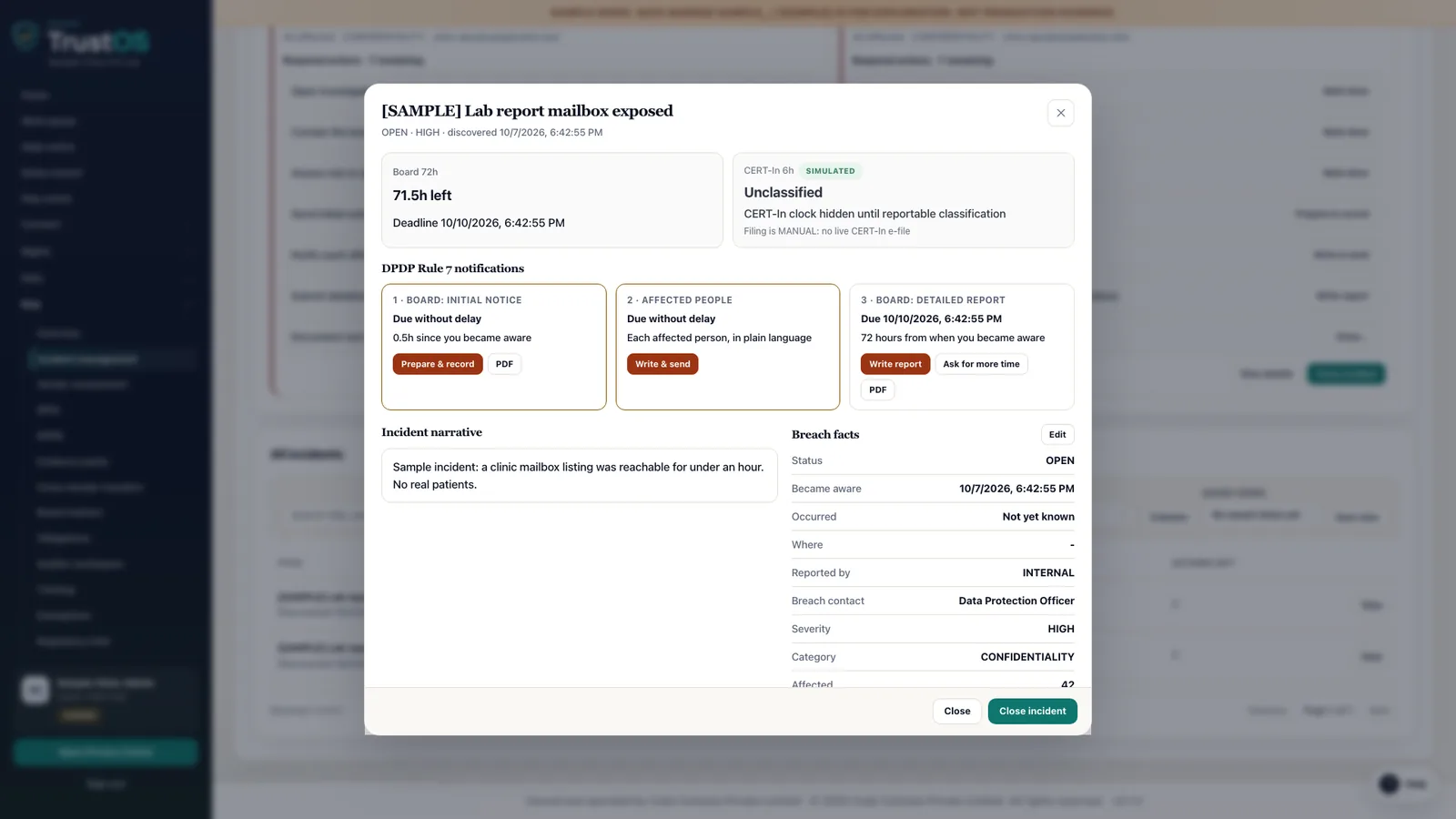
- Step 1Open the incident on Friday nightAt 11 pm an alert shows unusual exports from the loan app's document store. You open an incident, record the time you became aware and what is known so far, and the 72 hour countdown appears for everyone assigned, including legal and the DPO.
- Step 2Work out who is affectedThe inventory shows the document store holds KYC documents and bank statements for borrowers. Technology runs a search through the connector to count affected borrowers and pull their contact details, and the result is attached to the incident.
- Step 3Prepare the Board report and borrower messagesLegal drafts the intimation and the detailed report from the incident record: what happened, when, how many people, the likely impact and the steps taken. Communications drafts the message to borrowers in English and Hindi. Every draft and approval is kept.
- Step 4Close with remediation and evidenceOver the following weeks you record the root cause, the rotated keys, the access review and the fixes. The incident closes with a timeline that the Board, an auditor or your own directors can follow step by step.
Modules
Where this team spends its time
- Breach responseRun a personal data breach from first alert to Board report with one clock.Usually leads
- Data inventoryA working record of what personal data you hold, where it sits and who touches it.Works in it
- Connectors and actionsFind a person's data in your systems, act on it, and record what really happened.Works in it
- Processors and assessmentsKnow which vendors handle your personal data, on what terms, and what could go wrong.Works in it
- Evidence and auditAnswer an auditor's question with the record, in minutes.Works in it
The roles in this team: Security lead. All roles
Questions
Asked by teams like yours
Does TrustOS replace our SIEM or incident tools?
No. Detection and forensics stay with the tools you already run. TrustOS holds the DPDP side of the incident: who is affected, what was reported to the Board and to Data Principals, when, and who approved it.
How does it help with the Rule 6 safeguards?
For each system that holds personal data you record the safeguards in place, such as encryption, masking, access control, log retention and backups, with an owner and evidence. Gaps become assigned tasks with due dates.
What about CERT-In reporting?
CERT-In reporting follows its own directions and timelines. You can log that report in the same incident as the DPDP intimation so both are visible together. Filing is done by your team through the official channels.
See it with your data
Show us where your personal data lives. We will show you TrustOS running on it.
A 30 minute walkthrough on Google Meet with someone who knows the Act and the product. You leave with a view of your first phase, the owners and the effort.
Or get a rollout proposal in two minutes- Step 1A 30 minute demo on Google MeetWith someone who knows the Act and the product.
- Step 2Your systems and purposesWe walk one product's personal data through TrustOS.
- Step 3A first phase you can planModules, owners and effort, written down for you to keep.