
Platform · Breach response
Run a personal data breach from first alert to Board report with one clock.
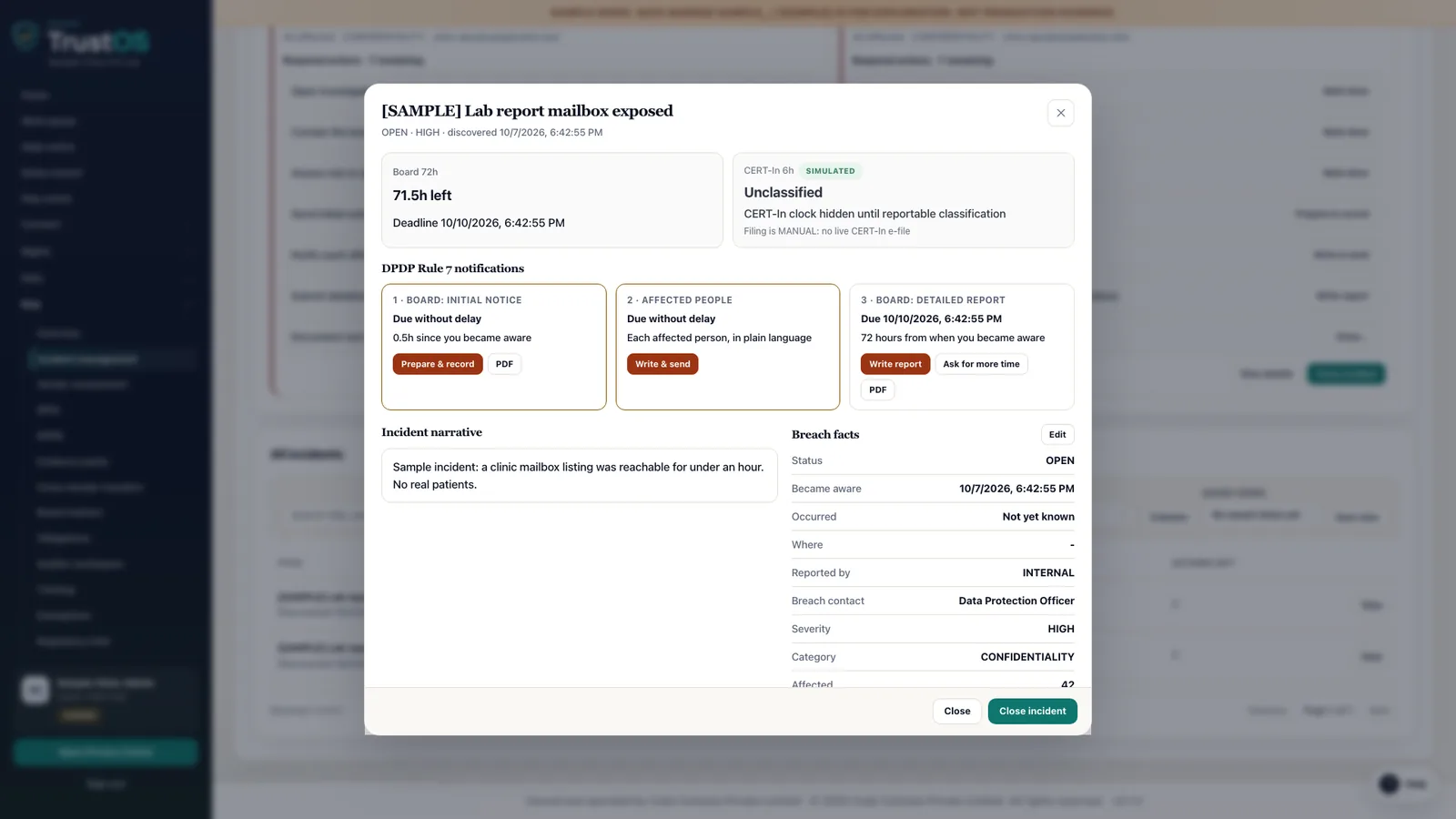
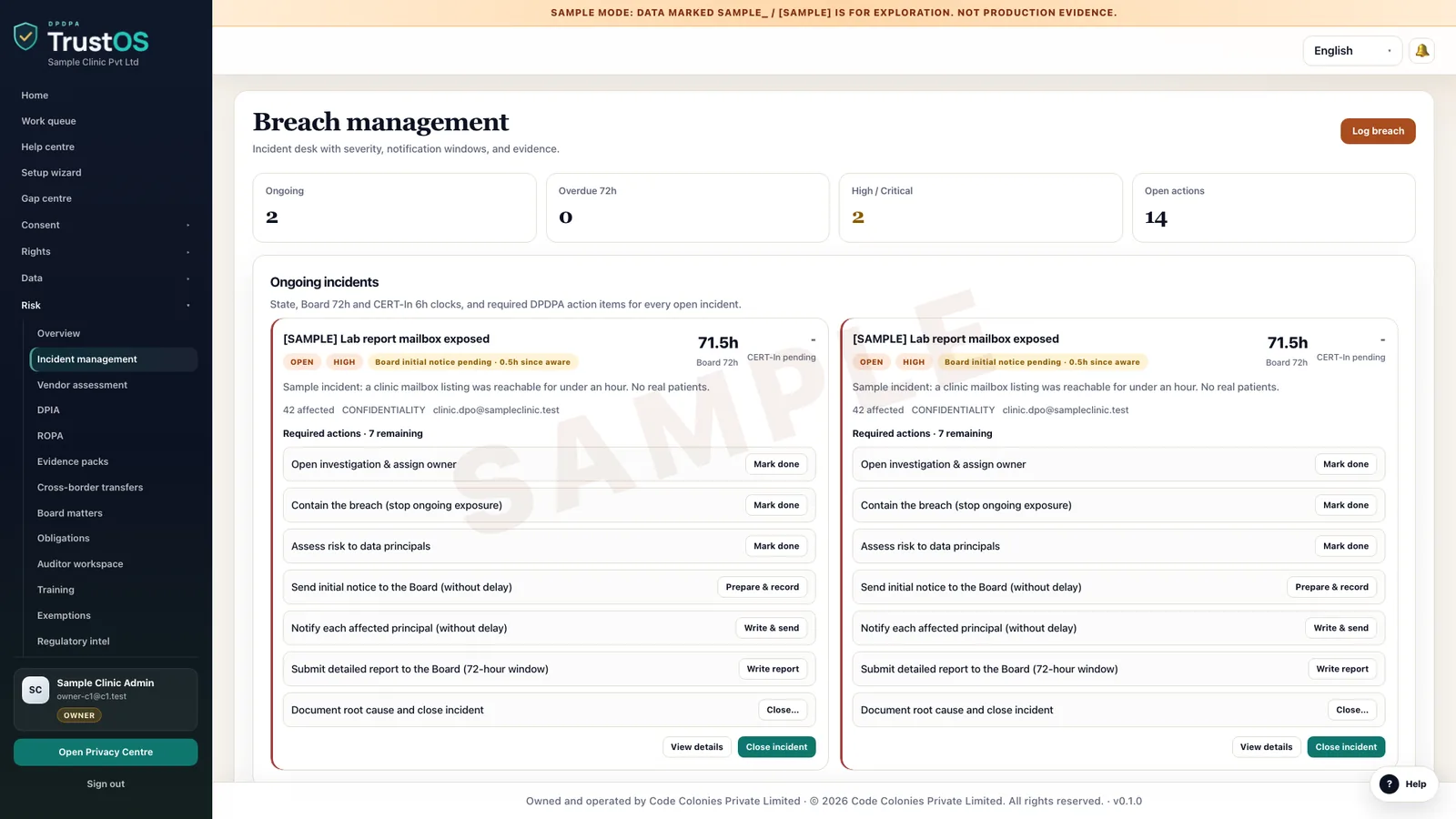
Open an incident the moment personal data may be affected, record when you became aware, and work through scoping, containment and notices with every step timed. TrustOS keeps the intimation to affected people and the Board, and the detailed report due within 72 hours, in one record.
The problem
The first hours are spent finding out who knows what
A hospital's IT team spots an exposed S3 bucket holding discharge summaries at 11 pm on a Friday. Security is on a call, legal hears about it on Saturday afternoon, and nobody can say when the hospital first became aware, how many patients are affected, or whether patients have been told. By Monday the facts exist in three WhatsApp groups and an email thread, and the 72 hour clock has been running all along.
What the DPDP Act asks
Under the DPDP Rules, a Data Fiduciary that becomes aware of a personal data breach must inform each affected Data Principal without delay, in plain language, covering what happened, the likely consequences, what is being done and what they can do. It must also inform the Data Protection Board without delay, and then send a detailed report within 72 hours of becoming aware, or within a longer period if the Board allows on request. The Act provides for penalties of up to 200 crore rupees for failing to notify the Board or affected people.
A plain summary. It is not legal advice. Read the DPDP Act guide.
The breach clock
The clock starts when you become aware
Tell the Board and the people affected without delay. Where the CERT-In directions apply, report within 6 hours. Send the Board a detailed report within 72 hours, unless it allows longer. Not legal advice.
What it does
What breach response gives your team
Awareness time recorded first
The incident record opens with the time the organisation became aware, who reported it and how. Every deadline is counted from that time, and changes to it need a reason and an approver.
Two tracks, kept separate
The intimation to the Board without delay and the detailed report within 72 hours are separate tasks with separate owners. The screen shows how many hours are left on the report at all times.
Scoping from the inventory
The affected system is matched to the data inventory, so the team sees which data categories it holds and which purposes they serve. Connectors can search for affected people where a system is connected.
Notices to affected people
Draft the message to affected Data Principals from a template that covers the points the Rules ask for, approve it, and record who was told, by which channel, and when. English, Hindi or the patient's own language can be used.
Decision log
Containment steps, legal advice taken, the call on whether personal data was actually affected, and who made each decision are logged as they happen. The log becomes the backbone of the detailed report.
Processor incidents
When a processor such as a cloud host or call centre reports a breach to you, its notice and timings are recorded in the same incident, so your own clock and theirs can be compared.
How the work moves
Step by step, inside TrustOS
- Step 1Open the incidentAnyone on the response team opens it, records the awareness time and the first facts, and the response roles are notified.
- Step 2Contain and scopeSecurity records containment steps while privacy works out the systems, data categories and likely number of people affected.
- Step 3Inform without delayLegal approves the intimation to the Board and the message to affected people, and TrustOS records when each was sent.
- Step 4File the detailed reportThe decision log, scope and remediation are pulled into a report draft, reviewed and sent within 72 hours, or the extension request is recorded.
- Step 5Fix and reviewRemediation tasks are tracked to completion and the incident closes with a short review of what changes next time.
Records it keeps
The evidence builds as you work
- Incident record with awareness time, source and reporter
- Affected systems, data categories and count of Data Principals
- Containment and remediation steps with owners and times
- Intimation to the Data Protection Board and its timestamp
- Detailed report sent within 72 hours, or the extension requested
- Messages to affected Data Principals, channels and delivery status
- Decision log with legal advice and approvals
- Post incident review and follow up actions
Who uses it
The teams who rely on it most
The first team usually leads the work. The others act on what it assigns.
Questions
About breach response
When does the 72 hour period start?
The DPDP Rules count it from when the Data Fiduciary becomes aware of the breach. That is why TrustOS records the awareness time first and asks for a reason if it changes. How awareness applies to your facts is a question for your legal advisers.
Does TrustOS send the report to the Board for us?
TrustOS prepares and records the intimation and the detailed report, and logs when and how they were sent. Submission goes through whatever channel the Board specifies, and your team sends it.
Do we wait for the full facts before telling affected people?
The Rules ask for affected Data Principals to be informed without delay. TrustOS lets you send what you know, with what people should do now, and record a follow up when more is known.
Keep going
Related modules and reading
Module
Data inventory
A working record of what personal data you hold, where it sits and who touches it.
Learn moreModule
Connectors and actions
Find a person's data in your systems, act on it, and record what really happened.
Learn moreModule
Processors and assessments
Know which vendors handle your personal data, on what terms, and what could go wrong.
Learn moreGuide
Coordinating a breach from detection to closure
A personal data breach starts two notification duties and a 72 hour report, all counted from when you became aware. That work runs best from one shared incident record.
Learn moreGuide
Taking a Data Principal request to closure
Every rights request under the DPDP Act comes down to finding one person's data across all your systems and acting on it. The work runs in six steps: intake, identity checks, search, decisions, action and response.
Learn moreArticle
Meeting the reasonable security safeguards
Rule 6 of the DPDP Rules sets out what reasonable security safeguards means. Each measure has a practical form in an ordinary Indian company's systems and vendor contracts.
Learn moreSee it with your data
Show us where your personal data lives. We will show you TrustOS running on it.
A 30 minute walkthrough on Google Meet with someone who knows the Act and the product. You leave with a view of your first phase, the owners and the effort.
Or get a rollout proposal in two minutes- Step 1A 30 minute demo on Google MeetWith someone who knows the Act and the product.
- Step 2Your systems and purposesWe walk one product's personal data through TrustOS.
- Step 3A first phase you can planModules, owners and effort, written down for you to keep.